
Skip to content
West Main Tech Services LLC – IT Services Frederick MD
IT Services Frederick Maryland
  • Home
  • About Us
  • IT Services
    • Managed IT Services
    • Microsoft 365 Office Support
    • Security
    • Computer Repair
    • Cloud Support
    • Computer Services
    • VOIP Phone Service
  • Blog
  • Support
  • Contact Us
  • Knowledgebase
    • Privacy policy
    • Terms and Conditions
  • Frequently Asked Questions
West Main Tech Services LLC – IT Services Frederick MD
IT Services Frederick Maryland
  • About Us
  • Blog
  • Contact Us
  • Frequently Asked Questions
  • Gaithersburg Md Business IT services
  • Gaithersburg, MD 20879 Business IT Services
  • IT Services
    • Cloud Support
    • Computer Repair
    • Computer Services
    • Data Backup
    • Managed IT Services
    • Microsoft 365 Office Support
    • Security
    • VOIP Phone Service
  • IT Services Frederick MD | Managed IT & Computer Repair | West Main Tech
  • Medical and Dental Office IT Support
  • Privacy policy
  • Small Business IT Services
  • Support
  • Terms and Conditions
  • Testimonials
  • VOIP PHONE SYSTEM | EASY BUSINESS PHONES
West Main Tech Fav Icon

Microsoft Office 365

3
  • SETTING UP WINDOWS SERVER UPDATE SERVICES (WSUS)
  • INSTALLING VOLUME LICENSED MICROSOFT PROJECT WITH OFFICE 365
  • Cant Export from eDiscovery o365 due to new IE browser
West Main Tech Fav Icon

Scanning

3
  • SETTING UP WINDOWS SERVER UPDATE SERVICES (WSUS)
  • TWAIN DRIVER | HP MFP
  • Konica scan to office 365

server

2
  • SETTING UP WINDOWS SERVER UPDATE SERVICES (WSUS)
  • Poor performance when using the default custom user profile on Windows 10, Windows Server 2016, or Windows Server 2019
West Main Tech Fav Icon

workstation

4
  • INSTALLING VOLUME LICENSED MICROSOFT PROJECT WITH OFFICE 365
  • Poor performance when using the default custom user profile on Windows 10, Windows Server 2016, or Windows Server 2019
  • Konica scan to office 365
  • PC locking after 1 minute
View Categories
  • Home
  • Docs
  • Microsoft Office 365
  • Cant Export from eDiscovery o365 due to new IE browser

Cant Export from eDiscovery o365 due to new IE browser

< 1 min read

Use the eDiscovery Export Tool in Microsoft Edge #

As a result of recent changes to the newest version of Microsoft Edge, ClickOnce support is no longer enabled by default. To continue using the eDiscovery Export Tool to download Content Search or eDiscovery search results, you either need to use Microsoft Internet Explorer or enable ClickOnce support in the newest version of Microsoft Edge.

Enable ClickOnce support in Microsoft Edge #

  1. In Microsoft Edge, go to edge://flags/#edge-click-once.
  2. If the existing value is set to Default or Disabled in the dropdown list, change it to Enabled.
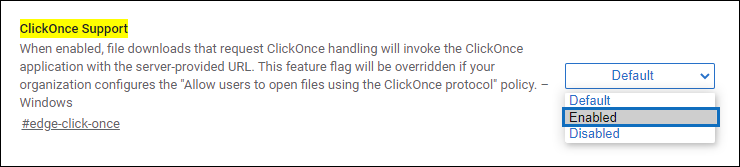
  3. Scroll down to the bottom of the browser window and click Restart to restart Edge.

Updated on July 7, 2020

What are your Feelings

  • Happy
  • Normal
  • Sad

Share This Article :

  • Facebook
  • X
  • LinkedIn
  • Pinterest
INSTALLING VOLUME LICENSED MICROSOFT PROJECT WITH OFFICE 365SETTING UP WINDOWS SERVER UPDATE SERVICES (WSUS)

Powered by BetterDocs

Leave a Reply Cancel reply

Your email address will not be published. Required fields are marked *

Table of Contents
  • Use the eDiscovery Export Tool in Microsoft Edge
    • Enable ClickOnce support in Microsoft Edge

Copyright © 2026 IT Services Frederick Maryland | Powered by Astra WordPress Theme